Home

More people are working remotely than ever before. If you are in one of those professions which allows you to work remotely, consider yourself to be really lucky. Many of you may not have enough experience in such remote only setup or even in such isolation.

From previously being a remote only developer, I found some routines and practices to be useful, some of these apply even when you are in a real office…

  • Pick a room or a corner of your home to consider your office. Never carry around the laptop wherever you go
  • Follow the strict schedule, as you would if you were in a real office
  • To start your day, take a walk around the block to come back home, will give you sense of commute
  • Dress-up like you are going to office
  • Create a TODO list for the day
  • Get an extra screen, a keyboard and a mouse
  • Take the same breaks as you would in office… lunch, snack, coffee and walk
  • Do not interpret or assume too much from the Slack messages, always confirm your understanding before making any change
  • Use audio or video call, whenever you need to discuss something at length
  • Keep your Slack messenger status up-to-date
  • Make sure to update the TODO list before signing out

Hopefully these help you bring some order to your work and give you more time for things you should be doing as well, like… playing with your kids, watching your favorite shows or movies, exercising, reading books and taking naps.

To conclude I will just add an excerpt from the book about Newton…

“He built bookshelves and made a small study for himself. He opened the nearly blank thousand-page commonplace book he had inherited from his stepfather and named it his Waste Book. He began filling it with reading notes. These mutated seamlessly into original research. He set himself problems; considered them obsessively; calculated answers, and asked new questions. He pushed past the frontier of knowledge (though he did not know this). The plague year was his transfiguration. Solitary and almost incommunicado, he became the world’s paramount mathematician.”

Book : Issac Newton, Author: James Gleick

LEAP Year

Imagine a garden; well maintained with different kinds of trees and plants. Some are native some are foreign to the land. Small, big, tall, short of all different sizes and colours. That’s what makes the garden so vibrant.

Everything is growing every day, some rapidly, some gradually, few are taking shelter under a bigger tree but, still growing. But no tree is overshadowing any other to halt its growth. On the surface, everybody appears to be fighting for the sunlight but underneath, all the roots are connected to each other and sharing everything.

Every tree produces something, at its own pace. Sometimes one thing produced by one becomes the food for the other. Occasionally it gets battered by a hail storm and at others with an excruciating heat or biting cold but it keeps producing.

New trees are planted in a way that neither the garden nor the tree loses its symmetry. Old ones though leave sometimes; none leaving without keeping traces of their roots intact.

Picture a planned garden, it has inviting little pathways which are well defined. Benches to relax and even a play area. One of those rare things which look as beautiful from the close-up as it does from the distance. Nothing seems out of its place. If you were to describe it in one word, you would call it harmony.

This quote would explain the importance of that word in this context …

If we are to live in harmony with ourselves and with nature, we need to be able to communicate freely in a creative movement in which no one permanently holds to or otherwise defends his own ideas.

Legendary physicist David Bohm

Now. Imagine a workplace…

Its been a year working at LEAP Dev, I don’t have to untangle the vines of my metaphor. You get the point. It just has been delightful to be a small plant of this garden.

Keeping up with the tech

Keeping up with everything in life is what we try to do all the time, relationships, friends, job. We feel the urge to know all the latest bits all the time, hence the excess use of social media.

But here, I am just going to document a specific plan, which I try to follow to keep up with always changing landscape of software development.

WHAT:

First thing is to know what to know. If you try to learn and keep up-to-date with everything, its quite daunting because of the breadth.

Whichever stream of development you are working in; just list down the current stack and the possible new additions to it. MAKE A LIST. Don’t make it overwhelmingly long.

HOW:

This part has so many options. Depends on which way of learning one prefers. Here is what I try to do, use social media but flip it on its head to use it for your benefit, instead of just being a huge time waste. Find people, leading speakers and leaders in general ,specifically in the technology stack you are interested in. Just follow them on Twitter. If that person has a Youtube channel, Podcast or a Blog subscribe to it.

Sometimes, they will post something not quite related to why you follow them but you should expect that and consider that following anybody comes with all of their opinions.

Resources…

Here are some of my favorite podcasts…

Here are some of the Youtube channels I subscribe to…

Books… its hard for technical books to remain current in this changing landscape. But I will list down few of my favorite timeless classics, because they don’t target specific technology…

There are many more resources you can find, I am sure there are better ones I may have missed.

WHEN:

This is the most important bit. Doesn’t matter what kind of commitments you have after work. You commute to work, take a bus/train or just drive. Listen to a podcast watch a 10 minute video(of course not while driving). You do chores, clean your house, do laundry; anything that doesn’t need your active attention can use a background score. All of this is just good enough for knowing the trend and the latest technologies.

You read and you forget, you watch and remember for a while but when you practice something you understand it. The best way to learn something or to remember it is to do it. Have a hobby project, everybody has ideas just start a project on one of your ideas, no matter how small or stupid they sound. Do it in the technology you want to learn, redo it when something new comes. This gives dual benefits, sparks your interest to learn something new and pushes forward that idea you always wanted to try.

There are varying ways in which people learn, I hope this guidance adds value in your process of acquiring knowledge.

Making JSON based data access easier in .net

JSON has become such a ubiquitous data exchange standard in recent times, specially after the advent of RESTful API and their use in mobile apps.

There are many ways to develop a data access layer in .net to achieve retrieval in JSON. But in most cases it requires a significant amount of boilerplate code. Ideally, data access should just act like generic router and be minimal.

Lets get to the point… the data access library project hosted at github tries to make life easier…e.g. if there is a stored procedure, fetch can be done to JSON string in couple of lines of code like below


SqlDataRequest dataRequest = new SqlDataRequest("[ConnectionString]");
 string result = dataRequest.Fetch("[usp_Test_Select]", "{ Id : 1 }"));

The first version is available to download at nuget

Because of its ease of use and serialization performance this library relies completely on  Newtonsoft JSON.net.

Check out the project page for more examples, more importantly since it is open source, review/criticize the code or make it better submit a pull request.


Kony Studio Microsoft Team Foundation Server Integration

This is tested with Kony Enterprise Studio 7.0.1 and TFS Server 2012.

Kony studio is based on Eclipse, so, everything one would do to achieve this for Eclipse should apply to Kony studio as well.

First step is to get the TFS plugin installed for Kony, and like mentioned, this is no different from how it’s done for Eclipse. Simply follow this link http://bit.ly/konytfs to install it.

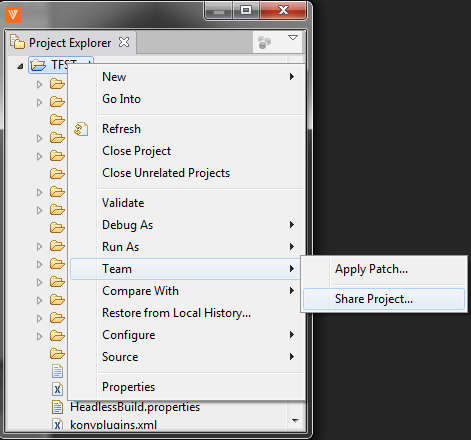
Once done, open your project go to menu Window>>Show View>>Project Explorer you will see below window

ProjectExplorer

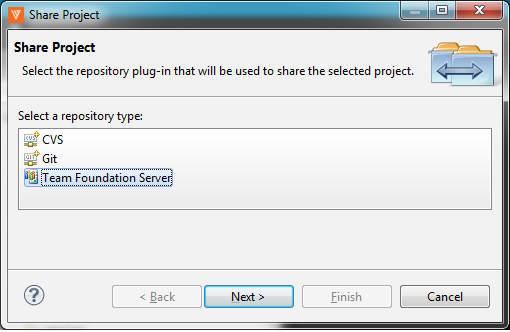
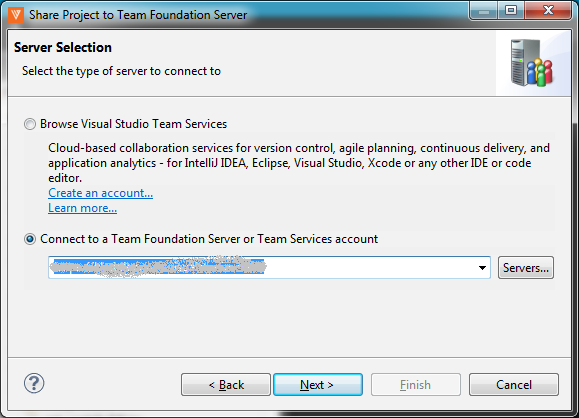
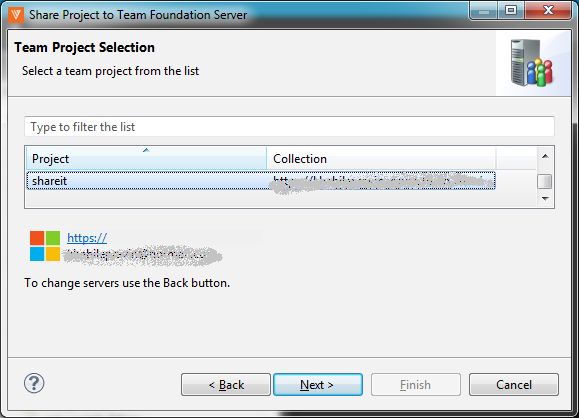
Right click on root folder Team>>Share Project link and follow the wizard…

  1. Plug-in selectorSCSelection-1
  2. TFS URLServerURL-2
  3. Server selectionProjectSelection-3
  4. Server project location ServerPath - 4

If this is the first time you are adding a project, it might show you an additional screen to create workspace. I suggest you do create a separate workspace for each of your projects, it makes life easier to track pending changes.

At the end of it, you should be all set to do check-in and check-out into TFS with Kony Studio.

Use comments to point out any mistakes or suggest enhancements…